Designed and Developed in the UK

TA Product Page

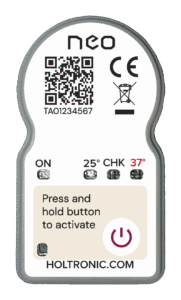
Electronic Time-Temperature Integrator Indicator. Visually displays when temperature exceeds 25°C, 37°C and when Calprotectin residual activity falls below 80%.
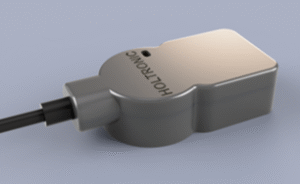
Wireless downloadable report via Holtronic-TA USB dongle displays:

Neo TTI-TA


Operating Instructions

How to use:

  1. To activate, press and hold the button for 1.5 seconds until the green ‘Power on’ LED flashes 3 times.
  2. Once the indicator has been activated the ‘Power’ LED will flash every 4 seconds.
  3. When the temperature:
    • rises above 25°C for 2 minutes cumulative, the green ‘25’ LED will flash
    • rises above 37°C for 2 minutes cumulative, the red ‘37’ LED will flash
  4. When calculated Calprotectin residual activity falls below 80%, the amber ‘CAL’ LED will flash
  5. To download CSV status report to PC/laptop:
    • Obtain Holtronic-TA USB dongle from holtronic.com
    • Connect USB dongle to laptop using a terminal emulator at 4800baud (e.g. Teraterm/Putty)
    • Press Holtronic-TA USB dongle over Neo to engage button and wirelessly receive data.
    • Green LED on dongle will flash to indicate reception of data

Shelf Life & Active Life

2 years | 6 Months

Environmental

IP54

Operating Temperature

-20°C to 60°C

Housing

Rigid Plastic

Battery

CR2032 lithium button cell

SIze

24.6mm x 44.5mm x 5.8mm

Weight

6g

Sensor

Internal NTC

Type of use

SIngle use, non-reversable

Activation

Hold button for 1.5sec ±0.5sec

Start Delay

0min ±100ms

Temperature Sample Period

60sec ±1ms

Temperature Alarms


27°C ± 0.5°C

37°C ± 0.5°C

Download your Calibration Certificate

Please ensure the ID number below matches the number under your QR code on your device.

federation-small-business-holtronic
RG-Logo
Radboud-umc
innovate-uk